


One API. Every Media Type. Any Scale.
Forge is the processing orchestrator that converts, protects, and generates media across 125+ formats with 30+ AI models. It dispatches work to specialized GPU and CPU workers, autoscales your fleet, and delivers results through webhooks, WebSockets, and message queues. Now with MCP support -- drive Forge directly from Claude or any AI assistant using natural language.
The Orchestration Engine
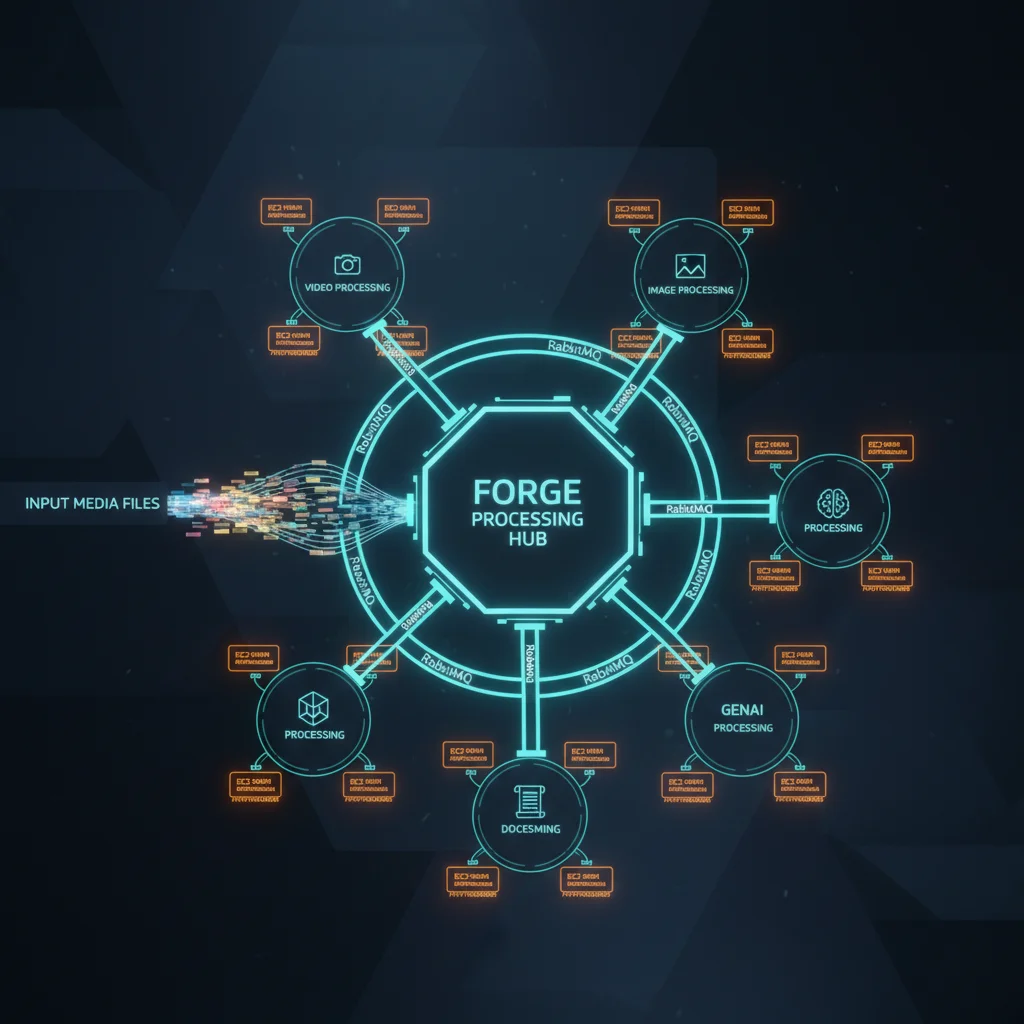
Forge doesn't process media -- it orchestrates a fleet of specialized workers. Upload any file, Forge routes it to the right worker via a message queue, manages the queue, scales the fleet, and notifies you the moment it's done.
Worker Orchestration
Routes jobs to specialized Video, Image, 3D, GenAI, and Document workers via dedicated progress queues. Each worker type is purpose-built for its domain.
Batch Processing
Submit up to 100 mixed-type files in a single API request. Forge decomposes the batch, routes each file to the correct worker, and reassembles results.
Cloud Autoscaling
Stateless scaling engine with a 5-second polling loop. Per-group scaling policies, cloud-native API calls, and built-in cost tracking.
Triple Notifications
Cryptographically signed webhooks, WebSocket push, and message queue delivery. Choose one or all three -- never miss a completion event.
API Security
API key authentication with cryptographic hashing, per-key rate limiting, and idempotency keys. Every request is authenticated, throttled, and deduplicated.
PWA Admin Dashboard
Installable progressive web app for monitoring jobs, managing webhooks, browsing S3, tracking costs, and configuring workers.
Studio-Grade Processing
From EXR film sequences to AI-generated video, Forge's internal workers handle every media type at production quality. ACES color science. GPU encoding. Turntable rendering. This is not consumer transcoding.

Frame Sequences to Playable Video
- EXR and DPX frame sequence assembly into H.264, H.265, and ProRes
- GPU hardware acceleration for hardware-accelerated output
- Watermark overlay injection during encode (visual + forensic)
- Configurable output resolution, bitrate, codec, and container
- Progress reporting with frame-level granularity
EXR Frames 0001-2400
Forge Video Worker
H.265 MP4
100+ Formats. Color Science Built In.
- 100+ input formats with multi-engine processing and intelligent fallback chains
- ACES and OCIO color management for accurate color transforms
- HDR processing (EXR, HDR, DPX, Radiance)
- 30+ RAW camera formats: Canon CR2/CR3, Nikon NEF/NRW, Sony ARW, Fuji RAF, Phase One IIQ, Hasselblad 3FR, Leica RWL, Pentax PEF, DNG, and more
- Forensic and visual watermarking
- Batch resize, format conversion, and metadata preservation
Supported Image Formats
+ 76 more formats supported
31+ Formats. Turntable Previews Included.
- 31+ 3D format support: USD/USDA/USDC/USDZ, Alembic (ABC), FBX, glTF/GLB, OBJ, STL, Blender, DAE, PLY, 3DS, and more
- Automated turntable rendering -- automatically generates a rotating video preview of any 3D asset
- Camera intelligence: automatic framing and lighting based on model bounding box
- Format conversion pipeline for format-to-format transforms
- Scene complexity analysis and polygon count reporting

30+ Models. One API Call.
Generate images, video, audio, and 3D assets from text prompts. Analyze visual content. Maintain character consistency with reference images. All through the same Forge API you use for everything else.

Image Generation
- Imagen 3.0 (Google)
- Imagen 3.0 Fast
- DALL-E 3 (OpenAI)
- DALL-E 3 HD
- GPT-Image 1.0
- GPT-Image 1.5
- Stable Diffusion 3.5
- SDXL (Stability)
- Flux 1.1 Pro (BFL)
- Flux 1.1 Ultra
- Recraft V3
- Ideogram V2
- Ideogram V2 Turbo
Video Generation
- Veo 3.0 (Google)
- Veo 3.5 (Google)
Audio & Speech
- ElevenLabs Multilingual v2
- ElevenLabs Flash v2.5
- OpenAI TTS
- OpenAI TTS HD
Vision & 3D
- GPT-4o Vision (OpenAI)
- Claude Vision (Anthropic)
- Gemini Vision (Google)
- Meshy (3D Gen)
- Tripo (3D Gen)
Character Consistency at Scale
Forge's reference image system lets you maintain visual consistency across generated outputs. Upload reference images and specify how they should influence generation.
Subject Reference
Maintain a character's appearance across multiple generated images. Upload a face or character reference and generate them in different poses, settings, and styles.
Style Reference
Apply the visual style of a reference image to new generations. Match lighting, color grading, artistic style, or photographic look.
Control Reference
Use structural references (depth maps, edge maps, pose skeletons) to control the composition and layout of generated images.
Office and PDF Processing
- PDF rendering with page-level extraction
- DOCX, PPTX, XLSX conversion to PDF or image
- OCR for scanned documents
- Metadata extraction and indexing

Format Support
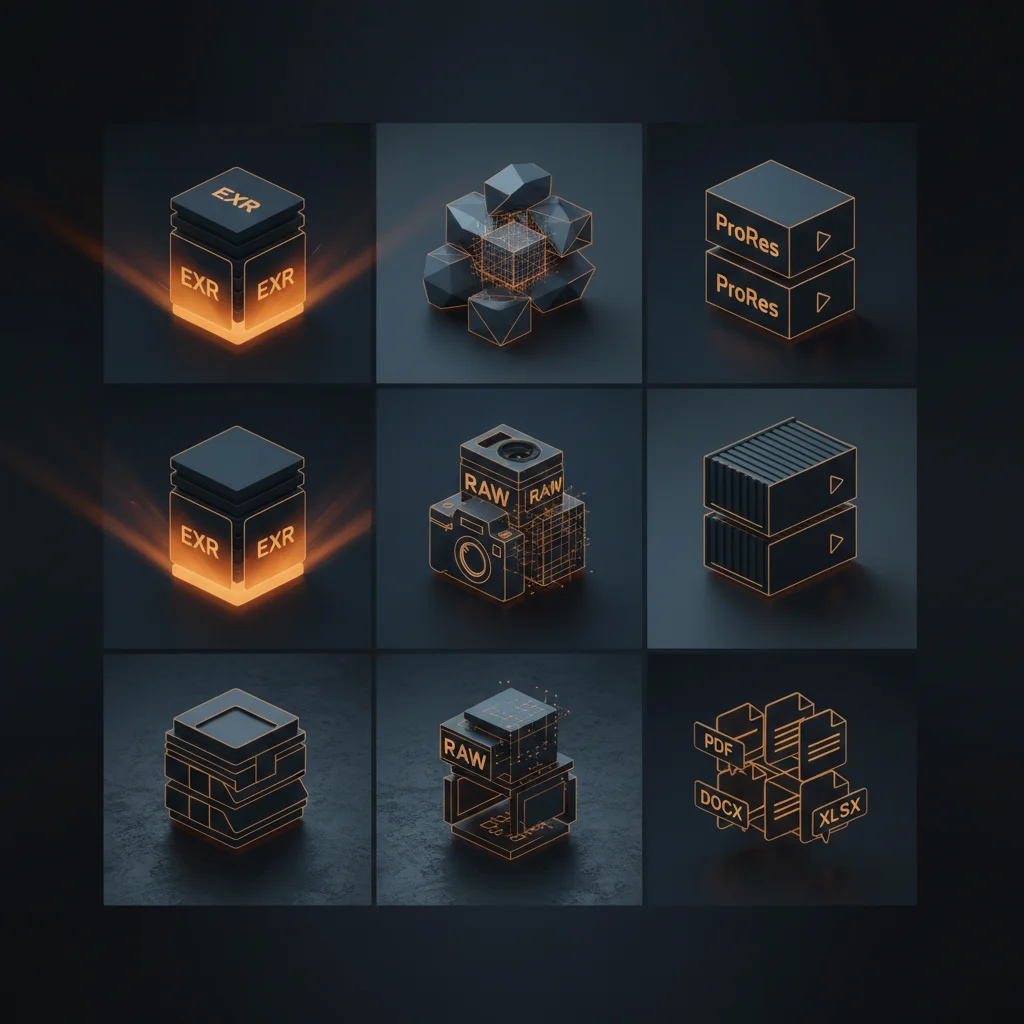
125+ formats across every media type. Search or browse by category.
30+ AI Models. One API Call.
Generate images, video, audio, and 3D assets from text prompts. Analyze visual content. Maintain character consistency with reference images. All through the same Forge API you use for everything else.
Image Generation
- Imagen 3.0 (Google)
- Imagen 3.0 Fast Fast
- DALL-E 3 (OpenAI)
- DALL-E 3 HD HD
- GPT-Image 1.0 (OpenAI) Reference Images
- GPT-Image 1.5 Reference Images
- Stable Diffusion 3.5 (Stability)
- SDXL (Stability)
- Flux 1.1 Pro (BFL)
- Flux 1.1 Ultra HD
- Recraft V3
- Ideogram V2
- Ideogram V2 Turbo Fast
Video Generation
- Veo 3.0 (Google)
- Veo 3.5 (Google)
Audio & Speech
- ElevenLabs Multilingual v2 Multilingual
- ElevenLabs Flash v2.5 Fast
- OpenAI TTS
- OpenAI TTS HD HD
Vision & Analysis
- GPT-4o Vision (OpenAI)
- Claude Vision (Anthropic)
- Gemini Vision (Google)
3D Generation
- Meshy
- Tripo
Character Consistency at Scale
Forge's reference image system lets you maintain visual consistency across generated outputs. Upload reference images and specify how they should influence generation.
Subject Reference
Maintain a character's appearance across multiple generated images. Upload a face or character reference and generate them in different poses, settings, and styles.
Style Reference
Apply the visual style of a reference image to new generations. Match lighting, color grading, artistic style, or photographic look.
Control Reference
Use structural references (depth maps, edge maps, pose skeletons) to control the composition and layout of generated images.
{
  "model": "gpt-image-1.5",
  "prompt": "Character standing in a medieval castle courtyard, dramatic lighting",
  "reference_images": [
    {
      "url": "s3://refs/character-face.jpg",
      "mode": "subject",
      "weight": 0.8
    },
    {
      "url": "s3://refs/cinematic-style.jpg",
      "mode": "style",
      "weight": 0.6
    }
  ],
  "output": {"format": "png", "width": 2048, "height": 2048}
}
The Processing Pipeline
Forge orchestrates a distributed architecture of specialized workers. From API request to delivered result, every component is designed for scale, reliability, and observability.
Forge orchestrates a distributed fleet of specialized workers, each optimized for its domain.
GPU Fleet That Scales Itself
Forge's autoscaling engine monitors queue depth every 5 seconds, launches GPU instances when work arrives, and terminates them when queues drain. Per-group policies. Built-in cost tracking.

- Stateless engine -- no single point of failure, any node can run the scaler
- Per-group scaling policies (e.g., GPU instances for video, CPU instances for documents)
- Queue-depth-based triggers with configurable thresholds
- Built-in cost tracking with per-job cost attribution
- Warm pool support for instant capacity during peak loads
- Graceful drain: in-flight jobs complete before instance termination
Know the Moment It's Done
Three independent notification channels ensure your pipeline never misses a processing event. Every webhook is cryptographically signed. Every API key is cryptographically hashed.
Webhooks
HMAC-SHA256 signed payloads. Configurable retry with exponential backoff. Delivery history and replay. Signature verification SDK.
WebSocket
WebSocket real-time push. Job progress, completion, and error events. Connection auto-recovery. The admin dashboard uses this channel.
Message Queue
Message queue delivery. Dedicated progress queues per worker type. Durable, persistent, acknowledgment-based. For backend-to-backend integration.
Security
Cryptographic hashing at rest, per-key rate limiting
Prevent duplicate processing with request deduplication
End-to-end encryption for all API traffic
Encryption at rest for all stored media assets
Configurable burst and sustained rates per key
Protect Every Asset
Forensic watermarking for leak tracing. Visual watermarking for WIP deterrence. Apply both simultaneously. Survive compression, cropping, and format conversion.
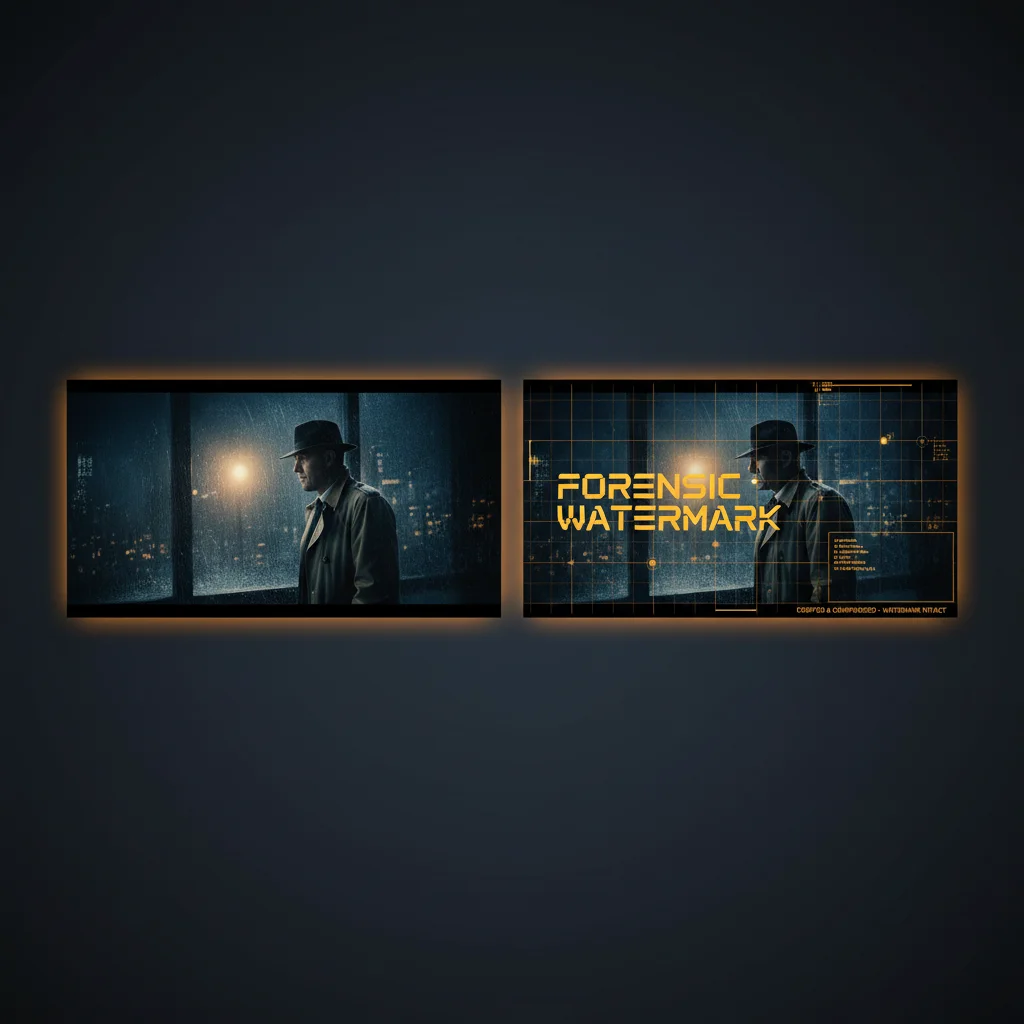
- Forensic watermarking: imperceptible payload embedded in pixel data, survives common transforms
- Visual watermarking: configurable text/image overlay with position, opacity, scale, rotation
- Template system: save and reuse watermark configurations across projects
- Dual mode: apply forensic + visual simultaneously in a single processing pass
- Frame-level watermarking for video sequences
- Extraction and verification API for forensic mark recovery
 What Forge Makes Possible
Forge turns raw production assets into deliverable media. Here's what that looks like in practice.
Before
EXR Frame Sequence
(2400 frames)
After
H.265 MP4
(GPU encoded)
Daily rushes from set to editorial in minutes, not hours
Before
USD/FBX 3D Model
After
Turntable Preview Video
Stakeholders review 3D assets without opening DCC tools
Before
Canon CR2 RAW
(30+ camera formats)
After
ACES-managed TIFF
Camera originals to color-accurate production stills
Before
Text Prompt +
Reference Images
After
Production-Ready Visual
AI-generated concept art, storyboards, and pre-viz
Before
Unprotected Master
After
Forensic + Visual
Watermarked
Content protection for screeners, dailies, and distribution
MCP Integration: AI-Driven Media Workflows
Forge now supports the Model Context Protocol (MCP), letting you create, convert, watermark, and manage media using natural language through Claude Desktop or any MCP-compatible AI assistant. No code required -- just describe what you need.
Natural Language Processing
Tell Claude "generate a sunset image" or "convert these EXR frames to MP4" and Forge handles the rest. Create media jobs, batch operations, and AI generations through conversation.
Watermark & Secure
Apply forensic and visual watermarks through simple prompts. "Watermark this video with our studio logo" -- Forge applies it with full template and positioning control.
Browse & Retrieve
Browse S3 storage, list recent jobs, check batch status, and download results -- all from within your AI assistant. No dashboard switching required.
10 MCP Tools Available
create_media_job -- Generate or process media
create_batch_jobs -- Submit multiple jobs at once
watermark_media -- Apply text or image watermarks
browse_s3 -- Browse files in S3 storage
get_job_status -- Check job progress
get_job_result -- Get outputs with download URLs
get_batch_status -- Check all jobs in a batch
get_signed_url -- Get temporary download links
list_jobs -- List and filter recent jobs
wait_for_job -- Wait for job completion